The Screenshot feature lets you capture the current video frame of your Streampixel application — without any frontend UI elements — and save it directly to the user’s device.Documentation Index
Fetch the complete documentation index at: https://docs.streampixel.io/llms.txt
Use this file to discover all available pages before exploring further.
Overview
The Screenshot feature allows you to capture a screenshot of your application without the frontend UI elements. The screenshot is automatically saved on the user’s device.How to video
Watch this quick demo on how to use the Screenshot feature in Streampixel.How to use
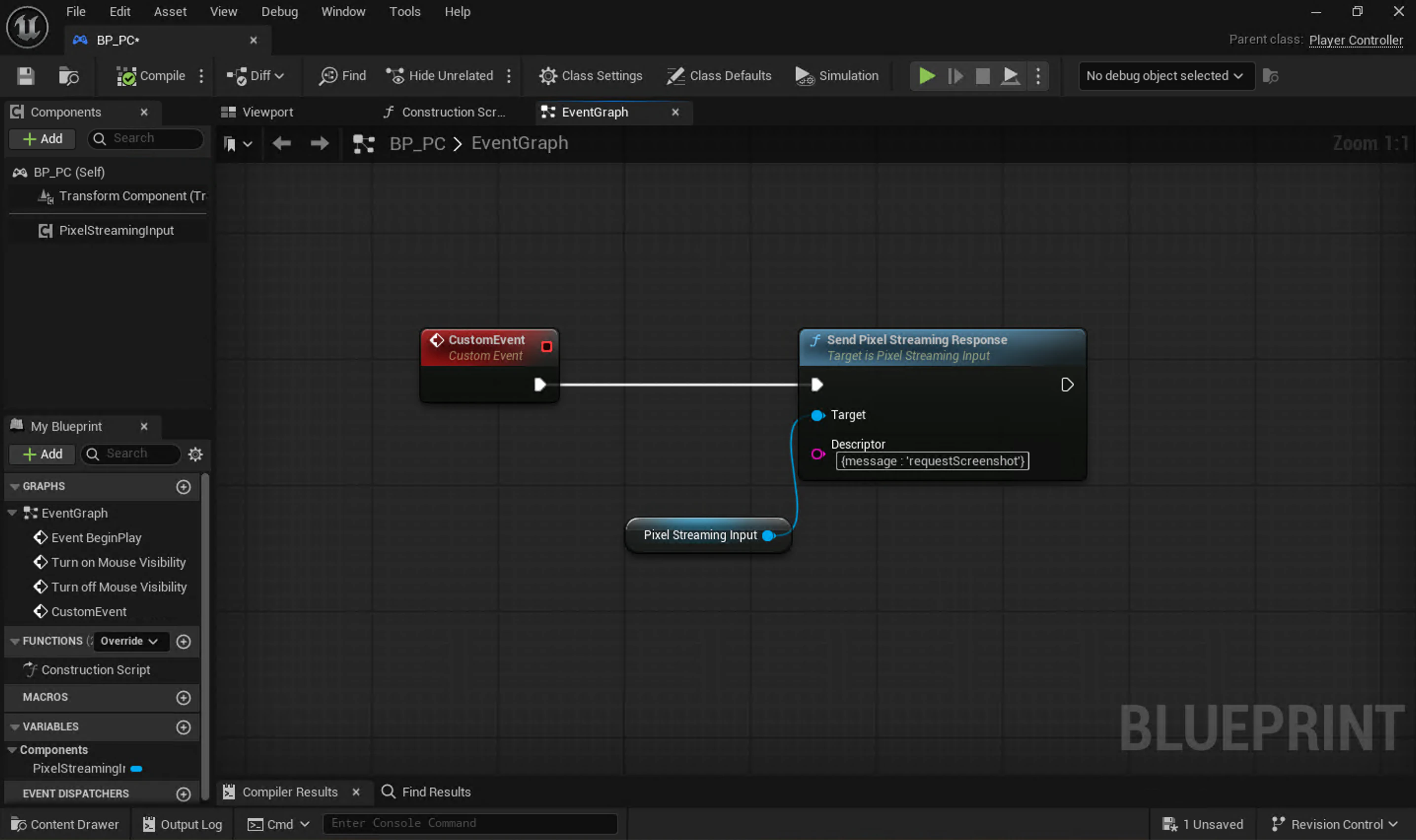
Screenshots can be initiated in two ways: From UnrealUnreal can send a
{message : 'requestScreenshot'} message using send pixel streaming response node to the frontend. The frontend captures the current video frame and downloads it directly to the user’s device.

If Streampixel is embedded inside an iframe, the parent application can send the
{message : 'requestScreenshot'} message to trigger the same behavior. Refer to #id-10.-screenshot-message