Send a screenshot, a report or any other file from your Unreal application to the viewer’s browser, where it is saved as a download.
Your application can send a file to the viewer while the stream is running. The file travels over the stream’s own data channel, and the viewer’s browser saves it as a download. No extra server, upload step or frontend code is needed.Common uses:
A high-resolution screenshot or render of the current scene.
A generated document, such as a quote, a specification sheet or a report.
An exported configuration or save file.
Before you start
The Pixel Streaming or Pixel Streaming 2 plugin is enabled in your project. Enable only one of them. The node on this page has the same name in both.
The viewer is connected and the stream has started. A file sent earlier is not delivered.
You give the node a file on disk, its type and its extension.
2
The plugin sends the file in pieces
The pieces travel over the data channel of the WebRTC connection that carries the stream.
3
The browser puts the file back together
The Streampixel player shows the progress, then saves the file to the viewer’s device.
Node reference
Send File
Sends a file that exists on disk.
Input
Type
Description
Filepath
String
Full path of the file on the machine that runs your application.
Mime Type
String
The file’s media type, for example image/png. The browser uses it to decide how to handle the file.
File Extension
String
The extension the saved file gets, for example .png. Include the dot.
Send File as Byte Array
Sends data that is in memory and has not been written to disk. It takes a byte array in place of Filepath, with the same Mime Type and File Extension.
Common types
File
Mime Type
File Extension
PNG image
image/png
.png
JPEG image
image/jpeg
.jpg
PDF document
application/pdf
.pdf
Plain text
text/plain
.txt
CSV table
text/csv
.csv
JSON data
application/json
.json
ZIP archive
application/zip
.zip
Send an existing file
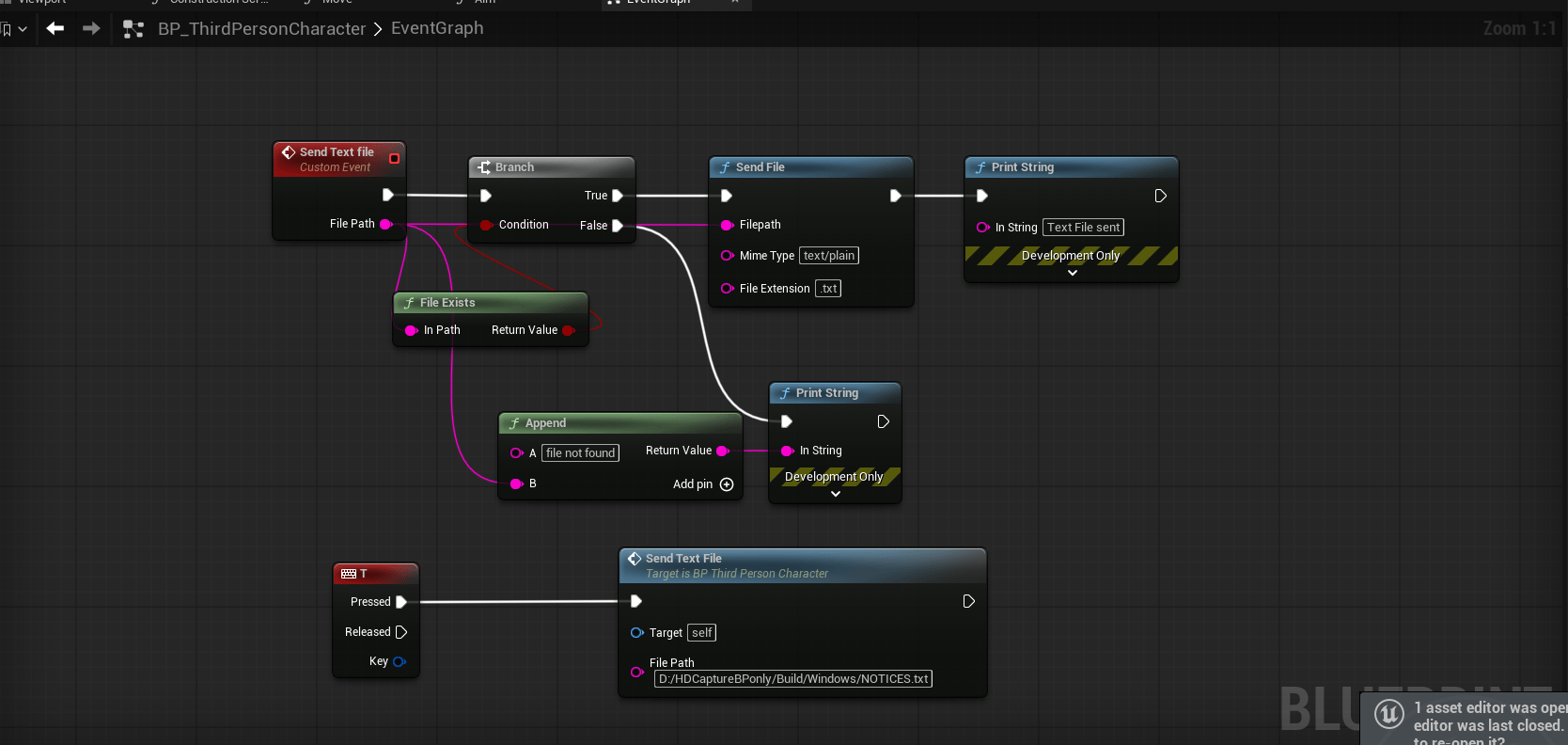
Check that the file exists, then send it.
Send a text file when it exists, and report the path when it does not
1
Create a custom event with a File Path input
One event can then send any file.
2
Check the file with File Exists
Connect the result to a Branch.
3
On True, call Send File
Connect File Path to Filepath. Set Mime Type and File Extension to match the file.
4
On False, report the problem
Print or log the path, so a wrong path is easy to spot while testing.
Send a file your application creates
A file that is still being written cannot be sent. Start the work, wait until the file exists, then send it. This example takes a high-resolution screenshot and sends it to the viewer.
1
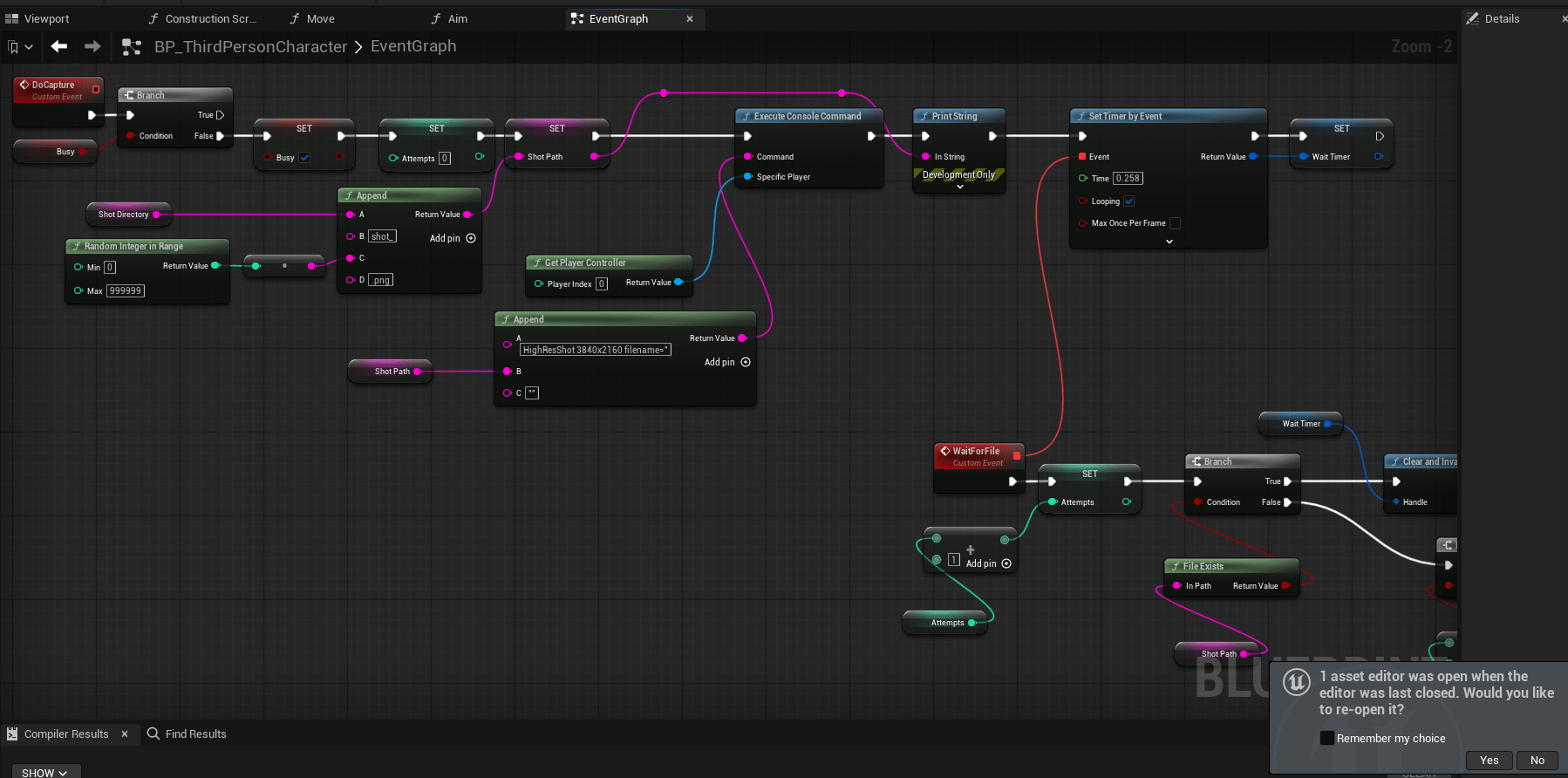
Start the capture
Build a unique file path, run the HighResShot console command with that path, and start a looping timer that checks for the file.
Build the path, run HighResShot, and start the timer
The Busy flag stops a second capture from starting while one is in progress. A random number in the file name keeps two captures from writing to the same file.
2
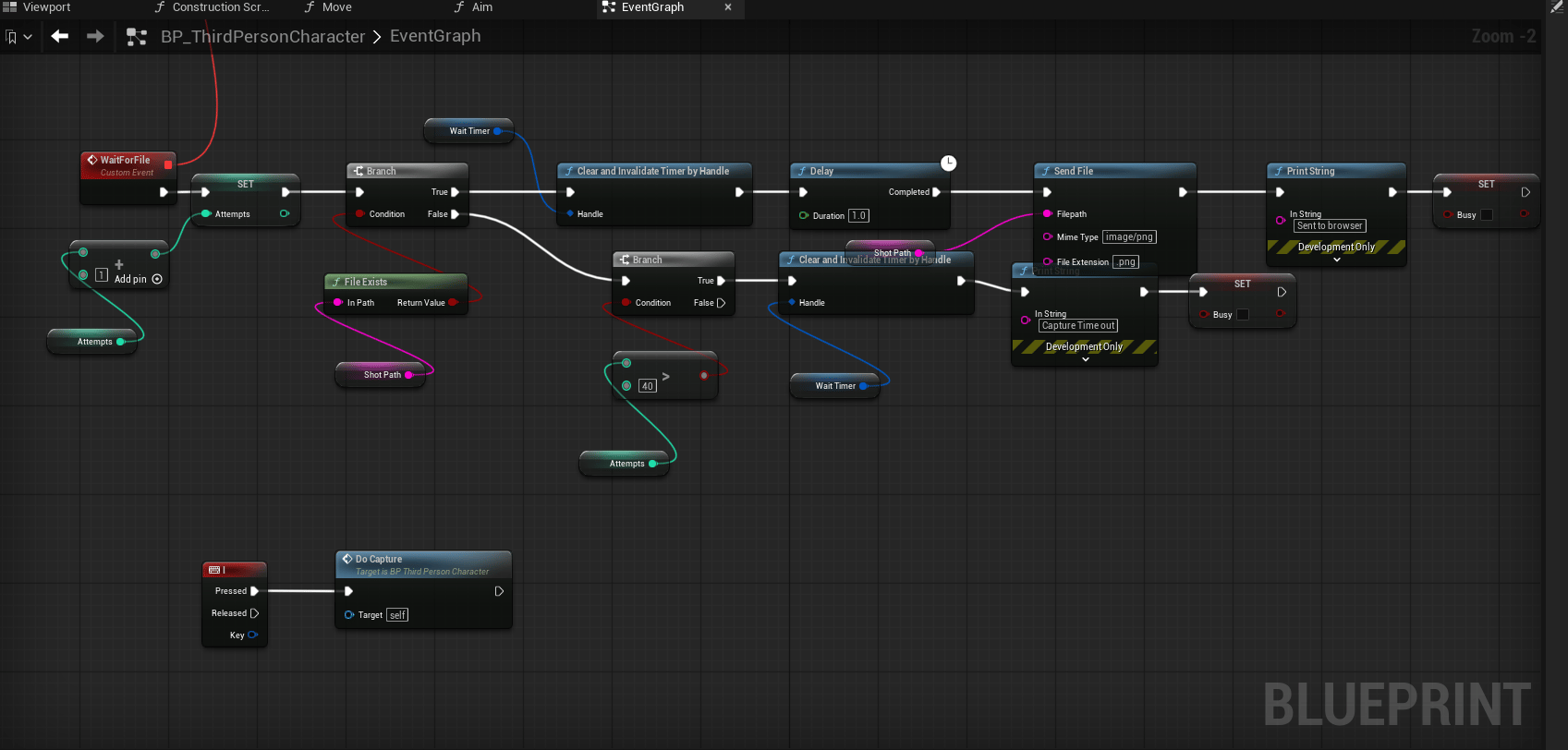
Wait for the file, then send it
Each time the timer fires, count the attempt and check File Exists.
The file exists: clear the timer, wait about a second so the write finishes, then call Send File with image/png and .png.
The file does not exist yet: let the timer fire again.
Too many attempts: clear the timer and reset Busy, so the application never waits for ever.
Poll for the file, send it, and stop after 40 attempts
What the viewer sees
On the Streampixel player, including when it is embedded in an iframe:
Stage
Desktop
iPhone and iPad
File arriving
A card shows Receiving… with the percentage and the amount received.
The same card.
File complete
The file downloads automatically. The card offers Download again.
The card shows a Save button, which opens the system share sheet.
The saved file is named capture-<date>-<time> followed by your extension, for example capture-20261116-143005.png. Pixel Streaming sends the type and the extension of a file, not its name.
File paths on a streaming server
On Streampixel your application runs on a streaming server, not on your computer.
A fixed path such as D:/MyProject/Exports/file.txt exists only on your own machine. Build paths at runtime from Get Project Saved Directory or Get Project Directory, so they are valid on any server.
Files are temporary. A file your application writes on a streaming server is not kept between sessions and is not available on other servers.
Sessions move between servers. The next session may run on a different server.
Persistent data belongs in your own storage. Send it to your backend or to cloud storage, keyed by your own user or account ID.
Limits and performance
Files share the connection with the stream and are sent in small pieces. Screenshots and documents arrive within moments.
A large file takes longer and competes with the video for bandwidth while it is being sent. For large files, give the viewer a link to download from your own storage.
Send one file at a time. Wait for a transfer to finish before starting the next.
Troubleshooting
Nothing is downloaded
Check these in order:
The path. Print the path and the result of File Exists before calling Send File. A path that works on your computer may not exist on the streaming server.
The timing. The viewer must be connected and the stream started before the file is sent.
The file is complete. If your application has just created the file, wait until it has finished writing. See Send a file your application creates.
The file is empty or cannot be opened
It was sent while it was still being written. Wait for the file to exist, then add a short delay before Send File.
The file has the wrong type or no extension
Set Mime Type and File Extension to match the file, and include the dot in the extension.
The file name is not the one I used
This is expected. The viewer’s file is named capture-<date>-<time> with your extension, because Pixel Streaming does not send a file name.
On iPhone or iPad the file does not download by itself
This is expected. The viewer taps Save on the card to store the file.
It works in the editor but not on Streampixel
The usual cause is a path that exists only on your computer. Build the path at runtime, and make sure the build is packaged with the content your application reads.
Next steps
Unreal side - sending and receiving JSON
Send values and status messages that are not files.
Screenshots
Capture the current video frame with one message, without a file.
{"docsConfig":{"theme":"mint","$schema":"https://mintlify.com/docs.json","name":"Streampixel","colors":{"primary":"#00B8E6","light":"#5BDFFF","dark":"#0098C2"},"logo":{"light":"https://mintcdn.com/streampixel/3A9zLaQxhTCIH06h/logo/logo.png?fit=max\u0026auto=format\u0026n=3A9zLaQxhTCIH06h\u0026q=85\u0026s=97d4efed69a7ba6432871781617e39fe","dark":"https://mintcdn.com/streampixel/3A9zLaQxhTCIH06h/logo/logo.png?fit=max\u0026auto=format\u0026n=3A9zLaQxhTCIH06h\u0026q=85\u0026s=97d4efed69a7ba6432871781617e39fe"},"favicon":"https://mintcdn.com/streampixel/3A9zLaQxhTCIH06h/favicon.png?fit=max\u0026auto=format\u0026n=3A9zLaQxhTCIH06h\u0026q=85\u0026s=62bf1ddb75c1efac5b837698245aa6ed","appearance":{"default":"dark"},"background":{"decoration":"gradient","color":{"light":"#FFFFFF","dark":"#0A0A0A"}},"navbar":{"links":[{"href":"https://status.streampixel.io","label":"Status"},{"href":"mailto:support@streampixel.io","label":"Support"},{"href":"https://dashboard.streampixel.io","label":"Dashboard"}],"primary":{"type":"button","label":"Start free","href":"https://dashboard.streampixel.io"}},"footer":{"socials":{"github":"https://github.com/infinity-void-metaverse","x":"https://x.com/streampixel","linkedin":"https://www.linkedin.com/company/streampixel"},"links":[{"header":"Product","items":[{"label":"Dashboard","href":"https://dashboard.streampixel.io"},{"label":"Pricing","href":"https://streampixel.io/pricing"},{"label":"Status","href":"https://status.streampixel.io"}]},{"header":"Developers","items":[{"label":"Get Started","href":"/resources/quick-start-guide/register-and-sign-in"},{"label":"Web SDK","href":"/resources/web-sdk-v2/overview"},{"label":"REST API","href":"/resources/api-reference/overview"},{"label":"Example app","href":"https://github.com/infinity-void-metaverse/Streampixel-SDK-Example"}]},{"header":"Company","items":[{"label":"Contact","href":"mailto:support@streampixel.io"},{"label":"GitHub","href":"https://github.com/infinity-void-metaverse"}]}]},"search":{"prompt":"Ask the docs..."},"seo":{"indexing":"navigable"},"styling":{"eyebrows":"breadcrumbs","codeblocks":"dark","latex":false},"navigation":{"global":{},"pages":[]}},"deployment":{"deploymentMetadataValue":{"subdomain":"streampixel","hasAudioNarration":false,"actualSubdomain":"streampixel","customDomains":["docs.streampixel.io"],"gitSource":{"type":"github","owner":"infinity-void-metaverse","repo":"streampixel-documentation","deployBranch":"main","contentDirectory":"","isPrivate":true,"mountPath":"","label":""},"feedback":{"agentFeedback":true},"entitlements":{"AI_CHAT":{"status":"DISABLED"}},"buildId":"6afaec66eb13d58ceebf8c76","clientVersion":"0.0.4160","searchFilterCounts":[{"language":"default","tag":"Dashboard","count":35},{"language":"default","tag":"REST API","count":28},{"language":"default","tag":"Web SDK","count":23},{"language":"default","tag":"Guides \u0026 Reference","count":19},{"language":"default","tag":"Reference","count":13},{"language":"default","tag":"Get Started","count":8},{"language":"default","tag":"Sessions \u0026 analytics","count":8},{"language":"default","tag":"Project settings","count":8},{"language":"default","tag":"Use cases","count":7},{"language":"default","tag":"Go further","count":7}]},"assistantConfig":{"enableAskAiButton":false,"enableStarterQuestions":false,"enableContextualStarterQuestions":false,"enableAskAiSearchBar":true},"basePath":"","hasChatPermissions":false,"hasWebMcpPermissions":false,"toggles":[{"name":"kill-isr","enabled":true,"variant":{"name":"disabled","enabled":false,"feature_enabled":true},"impressionData":false},{"name":"custom-rbac-roles","enabled":true,"variant":{"name":"disabled","enabled":false,"feature_enabled":true},"impressionData":false},{"name":"agent-mintlify-slack","enabled":true,"variant":{"name":"disabled","enabled":false,"feature_enabled":true},"impressionData":false},{"name":"agent-integrations-settings","enabled":true,"variant":{"name":"disabled","enabled":false,"feature_enabled":true},"impressionData":false},{"name":"rbac-expansion","enabled":true,"variant":{"name":"disabled","enabled":false,"feature_enabled":true},"impressionData":false},{"name":"automations-pr-grouping","enabled":true,"variant":{"name":"disabled","enabled":false,"feature_enabled":true},"impressionData":false},{"name":"custom-prefix","enabled":true,"variant":{"name":"disabled","enabled":false,"feature_enabled":true},"impressionData":false},{"name":"analytics-v7","enabled":true,"variant":{"name":"disabled","enabled":false,"feature_enabled":true},"impressionData":false},{"name":"user-flows-analytics","enabled":true,"variant":{"name":"disabled","enabled":false,"feature_enabled":true},"impressionData":false},{"name":"no-publish-flow","enabled":true,"variant":{"name":"disabled","enabled":false,"feature_enabled":true},"impressionData":false},{"name":"workos-onboarding","enabled":true,"variant":{"name":"disabled","enabled":false,"feature_enabled":true},"impressionData":false},{"name":"snapshot-serving-live","enabled":true,"variant":{"name":"disabled","enabled":false,"feature_enabled":true},"impressionData":false},{"name":"stripTemperatureMiddleware","enabled":true,"variant":{"name":"disabled","enabled":false,"feature_enabled":true},"impressionData":false},{"name":"support-platform-pylon-zendesk","enabled":true,"variant":{"name":"disabled","enabled":false,"feature_enabled":true},"impressionData":false},{"name":"snapshot-serving","enabled":true,"variant":{"name":"disabled","enabled":false,"feature_enabled":true},"impressionData":false},{"name":"instant-rollback","enabled":true,"variant":{"name":"disabled","enabled":false,"feature_enabled":true},"impressionData":false},{"name":"granular-notifications-server","enabled":true,"variant":{"name":"disabled","enabled":false,"feature_enabled":true},"impressionData":false},{"name":"granular-notifications","enabled":true,"variant":{"name":"disabled","enabled":false,"feature_enabled":true},"impressionData":false},{"name":"automations-fable","enabled":true,"variant":{"name":"disabled","enabled":false,"feature_enabled":true},"impressionData":false},{"name":"fixed-ai-action-pricing","enabled":true,"variant":{"name":"disabled","enabled":false,"feature_enabled":true},"impressionData":false},{"name":"automation-resolve-merge-conflict","enabled":true,"variant":{"name":"disabled","enabled":false,"feature_enabled":true},"impressionData":false},{"name":"scoped-publishing","enabled":true,"variant":{"name":"disabled","enabled":false,"feature_enabled":true},"impressionData":false},{"name":"mintql","enabled":true,"variant":{"name":"disabled","enabled":false,"feature_enabled":true},"impressionData":false},{"name":"page-level-analytics","enabled":true,"variant":{"name":"disabled","enabled":false,"feature_enabled":true},"impressionData":false},{"name":"editor-version-history-v2","enabled":true,"variant":{"name":"disabled","enabled":false,"feature_enabled":true},"impressionData":false},{"name":"billing-page-v2","enabled":true,"variant":{"name":"disabled","enabled":false,"feature_enabled":true},"impressionData":false},{"name":"full-page-search","enabled":true,"variant":{"name":"disabled","enabled":false,"feature_enabled":true},"impressionData":false},{"name":"workspace-projects","enabled":true,"variant":{"name":"disabled","enabled":false,"feature_enabled":true},"impressionData":false},{"name":"assistant-v5","enabled":true,"variant":{"name":"disabled","enabled":false,"feature_enabled":true},"impressionData":false},{"name":"fork-pr-previews","enabled":true,"variant":{"name":"disabled","enabled":false,"feature_enabled":true},"impressionData":false},{"name":"revalidation-jwt","enabled":true,"variant":{"name":"disabled","enabled":false,"feature_enabled":true},"impressionData":false},{"name":"workos-sso-scim","enabled":true,"variant":{"name":"disabled","enabled":false,"feature_enabled":true},"impressionData":false},{"name":"hobby-abuse-scan","enabled":true,"variant":{"name":"disabled","enabled":false,"feature_enabled":true},"impressionData":false},{"name":"dashboard-inbox","enabled":true,"variant":{"name":"disabled","enabled":false,"feature_enabled":true},"impressionData":false},{"name":"workos-signup","enabled":true,"variant":{"name":"disabled","enabled":false,"feature_enabled":true},"impressionData":false},{"name":"turbopuffer-dual-write","enabled":true,"variant":{"name":"disabled","enabled":false,"feature_enabled":true},"impressionData":false},{"name":"workos-enabled","enabled":true,"variant":{"name":"disabled","enabled":false,"feature_enabled":true},"impressionData":false},{"name":"approve-review-flow","enabled":true,"variant":{"name":"disabled","enabled":false,"feature_enabled":true},"impressionData":false},{"name":"editor-metadata","enabled":true,"variant":{"name":"disabled","enabled":false,"feature_enabled":true},"impressionData":false},{"name":"sso-setup-deadline-banner","enabled":true,"variant":{"name":"disabled","enabled":false,"feature_enabled":true},"impressionData":false},{"name":"turbopuffer-serve","enabled":true,"variant":{"name":"disabled","enabled":false,"feature_enabled":true},"impressionData":false},{"name":"live-agents","enabled":true,"variant":{"name":"disabled","enabled":false,"feature_enabled":true},"impressionData":false},{"name":"llms-txt-v2","enabled":true,"variant":{"name":"disabled","enabled":false,"feature_enabled":true},"impressionData":false}],"googleFontsInlined":false},"customCss":[{"filePath":"styles/custom.css","content":":root{--sp-cyan: #00D4FF;--sp-cyan-bright: #00E5FF;--sp-cyan-soft: rgba(0, 212, 255, 0.12);--sp-cyan-glow: rgba(0, 212, 255, 0.28);--sp-cyan-fade: rgba(0, 212, 255, 0.04);--sp-teal: #1ABFB1;--sp-green: #1DB95C;--sp-bg-dark: #0A0A0A;--sp-card-dark: rgba(18, 18, 18, 0.7);--sp-card-solid: #121212;--sp-border-dark: rgba(255, 255, 255, 0.08);--sp-border-strong: rgba(255, 255, 255, 0.14)}.dark a[class*=\"card\"],.dark .card{position:relative;background:var(--sp-card-dark)!important;backdrop-filter:blur(14px);-webkit-backdrop-filter:blur(14px);border:1px solid var(--sp-border-dark)!important;box-shadow:inset 0 1px 0 rgba(255, 255, 255, 0.04),\n 0 8px 24px rgba(0, 0, 0, 0.25);transition:transform 220ms ease, border-color 220ms ease, box-shadow 220ms ease}.dark a[class*=\"card\"]:hover,.dark .card:hover{border-color:var(--sp-cyan-glow)!important;box-shadow:0 0 0 1px var(--sp-cyan-glow),\n 0 12px 32px rgba(0, 212, 255, 0.12),\n inset 0 1px 0 rgba(0, 212, 255, 0.06);transform:translateY(-2px)}.dark a[class*=\"card\"]::before,.dark .card::before{content:\"\";position:absolute;inset:0;border-radius:inherit;padding:1px;background:linear-gradient(\n 135deg,\n rgba(0, 212, 255, 0.18) 0%,\n transparent 35%,\n transparent 65%,\n rgba(26, 191, 177, 0.14) 100%\n );-webkit-mask:linear-gradient(#fff 0 0) content-box, linear-gradient(#fff 0 0);mask:linear-gradient(#fff 0 0) content-box, linear-gradient(#fff 0 0);-webkit-mask-composite:xor;mask-composite:exclude;opacity:0.5;pointer-events:none;transition:opacity 220ms ease}.dark a[class*=\"card\"]:hover::before,.dark .card:hover::before{opacity:1}.dark a[class*=\"card\"] svg,.dark .card svg{color:var(--sp-cyan)!important}.dark pre,.dark .prose pre{position:relative;border:1px solid var(--sp-border-dark);background:#0E0E0E!important}.dark pre code{background:transparent!important}.dark :not(pre)>code{background:var(--sp-cyan-soft)!important;color:var(--sp-cyan)!important;padding:0.15em 0.4em;border-radius:4px;font-weight:500;border:1px solid rgba(0, 212, 255, 0.18)}.dark [class*=\"step\"] [class*=\"circle\"],.dark .steps-container li::before{background:linear-gradient(135deg, var(--sp-cyan), #00A8D6)!important;color:#0A0A0A!important;font-weight:700;box-shadow:0 0 16px var(--sp-cyan-glow)}.dark [class*=\"callout\"][class*=\"info\"],.dark [class*=\"callout\"][class*=\"tip\"]{border-left-color:var(--sp-cyan)!important}.dark table{border:1px solid var(--sp-border-dark);border-radius:8px;overflow:hidden;background:rgba(14, 14, 14, 0.5);backdrop-filter:blur(8px);-webkit-backdrop-filter:blur(8px)}.dark thead{background:rgba(0, 212, 255, 0.05)}.dark th{color:var(--sp-cyan)!important;font-weight:600;letter-spacing:0.04em;text-transform:uppercase;font-size:0.75em}.dark tbody tr{border-top:1px solid var(--sp-border-dark)}.dark tbody tr:hover{background:rgba(0, 212, 255, 0.04)}.dark [class*=\"sidebar\"] [class*=\"active\"]{background:var(--sp-cyan-soft)!important;color:var(--sp-cyan)!important;border-left:2px solid var(--sp-cyan);box-shadow:inset 0 0 12px rgba(0, 212, 255, 0.08)}.prose h1{letter-spacing:-0.025em;font-weight:700}.prose h2{letter-spacing:-0.02em;font-weight:650;position:relative}.prose h3{letter-spacing:-0.015em}.sp-hero{position:relative;margin:-1rem -1rem 2.75rem -1rem;padding:3.25rem 2.25rem 3.75rem;border-radius:18px;background:radial-gradient(ellipse at 75% 25%, rgba(0, 212, 255, 0.18), transparent 55%),\n radial-gradient(ellipse at 20% 85%, rgba(26, 191, 177, 0.12), transparent 50%),\n linear-gradient(180deg, #0E0E0E 0%, #080808 100%);border:1px solid var(--sp-border-strong);overflow:hidden;isolation:isolate}.sp-hero-grid{position:absolute;inset:0;background-image:url(\"data:image/svg+xml,%3Csvg xmlns='http://www.w3.org/2000/svg' width='28' height='49' viewBox='0 0 28 49'%3E%3Cg fill-rule='evenodd'%3E%3Cg fill='%2300d4ff' fill-opacity='0.05'%3E%3Cpath d='M13.99 9.25l13 7.5v15l-13 7.5L1 31.75v-15l12.99-7.5zM3 17.9v12.7l10.99 6.34 11-6.35V17.9l-11-6.34L3 17.9zM0 15l12.98-7.5V0h-2v6.35L0 12.69v2.3zm0 18.5L12.98 41v8h-2v-6.85L0 35.81v-2.3zM15 0v7.5L27.99 15H28v-2.31h-.01L17 6.35V0h-2zm0 49v-8l12.99-7.5H28v2.31h-.01L17 42.15V49h-2z'/%3E%3C/g%3E%3C/g%3E%3C/svg%3E\");-webkit-mask-image:radial-gradient(ellipse at center, black 25%, transparent 80%);mask-image:radial-gradient(ellipse at center, black 25%, transparent 80%);pointer-events:none;z-index:0}.sp-hero-glow{position:absolute;width:60%;height:140%;top:-20%;right:-10%;background:radial-gradient(ellipse at center, rgba(0, 212, 255, 0.22) 0%, transparent 60%);filter:blur(24px);pointer-events:none;z-index:0;animation:sp-hero-glow-drift 14s ease-in-out infinite}@keyframes sp-hero-glow-drift{0%,100%{transform:translate(0, 0) scale(1);opacity:0.85}50%{transform:translate(-8%, 4%) scale(1.08);opacity:1}}.sp-hero>*:not(.sp-hero-grid):not(.sp-hero-glow){position:relative;z-index:1}.sp-hero-eyebrow{display:inline-flex;align-items:center;gap:0.5rem;font-size:0.72rem;font-weight:600;letter-spacing:0.14em;text-transform:uppercase;color:var(--sp-cyan);background:var(--sp-cyan-soft);border:1px solid rgba(0, 212, 255, 0.25);padding:0.4rem 0.85rem;border-radius:999px;margin-bottom:1.4rem;box-shadow:0 0 18px rgba(0, 212, 255, 0.12)}.sp-hero-eyebrow::before{content:\"\";width:6px;height:6px;border-radius:50%;background:var(--sp-cyan);box-shadow:0 0 8px var(--sp-cyan);animation:sp-pulse 1.6s ease-in-out infinite}@keyframes sp-pulse{0%,100%{opacity:1;box-shadow:0 0 0 0 rgba(0, 212, 255, 0.5)}50%{opacity:0.7;box-shadow:0 0 0 6px rgba(0, 212, 255, 0)}}.sp-hero-title{font-size:clamp(2.1rem, 5.2vw, 3rem);font-weight:700;letter-spacing:-0.032em;line-height:1.08;margin:0 0 0.85rem 0;background:linear-gradient(180deg, #ffffff 0%, #b8b8b8 100%);-webkit-background-clip:text;background-clip:text;color:transparent}.sp-hero-sub{font-size:1.1rem;line-height:1.55;color:rgba(255, 255, 255, 0.72);max-width:640px;margin:0 0 1.85rem 0}.sp-hero-cta-row{display:flex;flex-wrap:wrap;gap:0.75rem}.sp-hero-cta{display:inline-flex;align-items:center;gap:0.5rem;background:linear-gradient(135deg, var(--sp-cyan-bright), #00A8D6);color:#0A0A0A!important;font-weight:600;padding:0.75rem 1.4rem;border-radius:9px;text-decoration:none!important;box-shadow:0 0 0 1px rgba(0, 212, 255, 0.5),\n 0 0 28px var(--sp-cyan-glow),\n inset 0 1px 0 rgba(255, 255, 255, 0.25);transition:transform 150ms ease, box-shadow 150ms ease}.sp-hero-cta:hover{transform:translateY(-1px);box-shadow:0 0 0 1px rgba(0, 212, 255, 0.7),\n 0 0 36px rgba(0, 212, 255, 0.45),\n inset 0 1px 0 rgba(255, 255, 255, 0.3)}.sp-hero-cta-secondary{display:inline-flex;align-items:center;gap:0.5rem;color:rgba(255, 255, 255, 0.88)!important;background:rgba(255, 255, 255, 0.03);border:1px solid var(--sp-border-strong);padding:0.75rem 1.4rem;border-radius:9px;text-decoration:none!important;backdrop-filter:blur(8px);-webkit-backdrop-filter:blur(8px);transition:border-color 150ms ease, color 150ms ease, background 150ms ease}.sp-hero-cta-secondary:hover{border-color:var(--sp-cyan-glow);color:var(--sp-cyan)!important;background:rgba(0, 212, 255, 0.05)}:root:not(.dark) .sp-hero{background:radial-gradient(ellipse at 80% 20%, rgba(0, 184, 230, 0.10), transparent 55%),\n radial-gradient(ellipse at 20% 85%, rgba(26, 191, 177, 0.08), transparent 50%),\n linear-gradient(180deg, #FAFCFE 0%, #F2F6F9 100%);border:1px solid #E5E7EB}:root:not(.dark) .sp-hero-grid{background-image:url(\"data:image/svg+xml,%3Csvg xmlns='http://www.w3.org/2000/svg' width='28' height='49' viewBox='0 0 28 49'%3E%3Cg fill-rule='evenodd'%3E%3Cg fill='%230098C2' fill-opacity='0.06'%3E%3Cpath d='M13.99 9.25l13 7.5v15l-13 7.5L1 31.75v-15l12.99-7.5zM3 17.9v12.7l10.99 6.34 11-6.35V17.9l-11-6.34L3 17.9zM0 15l12.98-7.5V0h-2v6.35L0 12.69v2.3zm0 18.5L12.98 41v8h-2v-6.85L0 35.81v-2.3zM15 0v7.5L27.99 15H28v-2.31h-.01L17 6.35V0h-2zm0 49v-8l12.99-7.5H28v2.31h-.01L17 42.15V49h-2z'/%3E%3C/g%3E%3C/g%3E%3C/svg%3E\")}:root:not(.dark) .sp-hero-glow{background:radial-gradient(ellipse at center, rgba(0, 184, 230, 0.12) 0%, transparent 60%)}:root:not(.dark) .sp-hero-title{background:linear-gradient(180deg, #0A0A0A 0%, #404040 100%);-webkit-background-clip:text;background-clip:text;color:transparent}:root:not(.dark) .sp-hero-sub{color:#475569}:root:not(.dark) .sp-hero-eyebrow{color:#0098C2;background:rgba(0, 184, 230, 0.08);border-color:rgba(0, 184, 230, 0.25)}:root:not(.dark) .sp-hero-cta-secondary{color:#0F172A!important;background:rgba(255, 255, 255, 0.6);border-color:#D1D5DB}:root:not(.dark) :not(pre)>code{background:rgba(0, 184, 230, 0.08)!important;color:#006B8C!important;border-color:rgba(0, 184, 230, 0.2)}.dark ::-webkit-scrollbar{width:10px;height:10px}.dark ::-webkit-scrollbar-track{background:transparent}.dark ::-webkit-scrollbar-thumb{background:rgba(255, 255, 255, 0.08);border-radius:5px}.dark ::-webkit-scrollbar-thumb:hover{background:rgba(0, 212, 255, 0.25)}@media (prefers-reduced-motion: reduce){.sp-hero-glow{animation:none}.sp-hero-eyebrow::before{animation:none}.dark a[class*=\"card\"],.dark .card{transition:none}}"}],"page":{"pagePath":"resources/additional-unreal-engine-features/send-files-to-the-viewer","slug":"/resources/additional-unreal-engine-features/send-files-to-the-viewer","pageMetadata":{"title":"Send files to the viewer","description":"Send a screenshot, a report or any other file from your Unreal application to the viewer's browser, where it is saved as a download.","icon":"file-arrow-down","href":"/resources/additional-unreal-engine-features/send-files-to-the-viewer"},"description":{"compiledSource":"\"use strict\";\nconst {jsx: _jsx} = arguments[0];\nconst {useMDXComponents: _provideComponents} = arguments[0];\nfunction _createMdxContent(props) {\n const _components = {\n p: \"p\",\n ..._provideComponents(),\n ...props.components\n };\n return _jsx(_components.p, {\n children: \"Send a screenshot, a report or any other file from your Unreal application to the viewer’s browser, where it is saved as a download.\"\n });\n}\nfunction MDXContent(props = {}) {\n const {wrapper: MDXLayout} = {\n ..._provideComponents(),\n ...props.components\n };\n return MDXLayout ? _jsx(MDXLayout, {\n ...props,\n children: _jsx(_createMdxContent, {\n ...props\n })\n }) : _createMdxContent(props);\n}\nreturn {\n default: MDXContent\n};\n","frontmatter":{},"scope":{}},"pageType":"default","mdx":{"mdxSource":{"compiledSource":"\"use strict\";const{Fragment:_Fragment,jsx:_jsx,jsxs:_jsxs}=arguments[0];const{useMDXComponents:_provideComponents}=arguments[0];function _createMdxContent(props){const _components={a:`a`,code:`code`,li:`li`,ol:`ol`,p:`p`,strong:`strong`,tbody:`tbody`,td:`td`,th:`th`,thead:`thead`,tr:`tr`,ul:`ul`,..._provideComponents(),...props.components},{Accordion,AccordionGroup,Card,CardGroup,Frame,Heading,OptimizedImage,Step,Steps,Table,Warning}=_components;if(!Accordion)_missingMdxReference(`Accordion`,true);if(!AccordionGroup)_missingMdxReference(`AccordionGroup`,true);if(!Card)_missingMdxReference(`Card`,true);if(!CardGroup)_missingMdxReference(`CardGroup`,true);if(!Frame)_missingMdxReference(`Frame`,true);if(!Heading)_missingMdxReference(`Heading`,true);if(!OptimizedImage)_missingMdxReference(`OptimizedImage`,true);if(!Step)_missingMdxReference(`Step`,true);if(!Steps)_missingMdxReference(`Steps`,true);if(!Table)_missingMdxReference(`Table`,true);if(!Warning)_missingMdxReference(`Warning`,true);return _jsxs(_Fragment,{children:[_jsx(_components.p,{children:`Your application can send a file to the viewer while the stream is running. The file travels over the stream’s own data channel, and the viewer’s browser saves it as a download. No extra server, upload step or frontend code is needed.`}),`\n`,_jsx(_components.p,{children:`Common uses:`}),`\n`,_jsxs(_components.ul,{children:[`\n`,_jsx(_components.li,{children:`A high-resolution screenshot or render of the current scene.`}),`\n`,_jsx(_components.li,{children:`A generated document, such as a quote, a specification sheet or a report.`}),`\n`,_jsx(_components.li,{children:`An exported configuration or save file.`}),`\n`]}),`\n`,_jsx(Heading,{level:`2`,id:`before-you-start`,children:`Before you start`}),`\n`,_jsxs(_components.ul,{children:[`\n`,_jsxs(_components.li,{children:[`The `,_jsx(_components.strong,{children:`Pixel Streaming`}),` or `,_jsx(_components.strong,{children:`Pixel Streaming 2`}),` plugin is enabled in your project. Enable only one of them. The node on this page has the same name in both.`]}),`\n`,_jsx(_components.li,{children:`The viewer is connected and the stream has started. A file sent earlier is not delivered.`}),`\n`,_jsxs(_components.li,{children:[`You know where your application can write files at runtime. See `,_jsx(_components.a,{href:`#file-paths-on-a-streaming-server`,children:`File paths on a streaming server`}),`.`]}),`\n`]}),`\n`,_jsx(Heading,{level:`2`,id:`how-it-works`,children:`How it works`}),`\n`,_jsxs(Steps,{children:[_jsx(Step,{title:`Your application calls Send File`,children:_jsx(_components.p,{children:`You give the node a file on disk, its type and its extension.`})}),_jsx(Step,{title:`The plugin sends the file in pieces`,children:_jsx(_components.p,{children:`The pieces travel over the data channel of the WebRTC connection that carries the stream.`})}),_jsx(Step,{title:`The browser puts the file back together`,children:_jsx(_components.p,{children:`The Streampixel player shows the progress, then saves the file to the viewer’s device.`})})]}),`\n`,_jsx(Heading,{level:`2`,id:`node-reference`,children:`Node reference`}),`\n`,_jsx(Heading,{level:`3`,id:`send-file`,children:`Send File`}),`\n`,_jsx(_components.p,{children:`Sends a file that exists on disk.`}),`\n`,_jsxs(Table,{children:[_jsx(_components.thead,{children:_jsxs(_components.tr,{children:[_jsx(_components.th,{children:`Input`}),_jsx(_components.th,{children:`Type`}),_jsx(_components.th,{children:`Description`})]})}),_jsxs(_components.tbody,{children:[_jsxs(_components.tr,{children:[_jsx(_components.td,{children:_jsx(_components.strong,{children:`Filepath`})}),_jsx(_components.td,{children:`String`}),_jsx(_components.td,{children:`Full path of the file on the machine that runs your application.`})]}),_jsxs(_components.tr,{children:[_jsx(_components.td,{children:_jsx(_components.strong,{children:`Mime Type`})}),_jsx(_components.td,{children:`String`}),_jsxs(_components.td,{children:[`The file’s media type, for example `,_jsx(_components.code,{children:`image/png`}),`. The browser uses it to decide how to handle the file.`]})]}),_jsxs(_components.tr,{children:[_jsx(_components.td,{children:_jsx(_components.strong,{children:`File Extension`})}),_jsx(_components.td,{children:`String`}),_jsxs(_components.td,{children:[`The extension the saved file gets, for example `,_jsx(_components.code,{children:`.png`}),`. Include the dot.`]})]})]})]}),`\n`,_jsx(Heading,{level:`3`,id:`send-file-as-byte-array`,children:`Send File as Byte Array`}),`\n`,_jsxs(_components.p,{children:[`Sends data that is in memory and has not been written to disk. It takes a byte array in place of `,_jsx(_components.strong,{children:`Filepath`}),`, with the same `,_jsx(_components.strong,{children:`Mime Type`}),` and `,_jsx(_components.strong,{children:`File Extension`}),`.`]}),`\n`,_jsx(Heading,{level:`3`,id:`common-types`,children:`Common types`}),`\n`,_jsxs(Table,{children:[_jsx(_components.thead,{children:_jsxs(_components.tr,{children:[_jsx(_components.th,{children:`File`}),_jsx(_components.th,{children:`Mime Type`}),_jsx(_components.th,{children:`File Extension`})]})}),_jsxs(_components.tbody,{children:[_jsxs(_components.tr,{children:[_jsx(_components.td,{children:`PNG image`}),_jsx(_components.td,{children:_jsx(_components.code,{children:`image/png`})}),_jsx(_components.td,{children:_jsx(_components.code,{children:`.png`})})]}),_jsxs(_components.tr,{children:[_jsx(_components.td,{children:`JPEG image`}),_jsx(_components.td,{children:_jsx(_components.code,{children:`image/jpeg`})}),_jsx(_components.td,{children:_jsx(_components.code,{children:`.jpg`})})]}),_jsxs(_components.tr,{children:[_jsx(_components.td,{children:`PDF document`}),_jsx(_components.td,{children:_jsx(_components.code,{children:`application/pdf`})}),_jsx(_components.td,{children:_jsx(_components.code,{children:`.pdf`})})]}),_jsxs(_components.tr,{children:[_jsx(_components.td,{children:`Plain text`}),_jsx(_components.td,{children:_jsx(_components.code,{children:`text/plain`})}),_jsx(_components.td,{children:_jsx(_components.code,{children:`.txt`})})]}),_jsxs(_components.tr,{children:[_jsx(_components.td,{children:`CSV table`}),_jsx(_components.td,{children:_jsx(_components.code,{children:`text/csv`})}),_jsx(_components.td,{children:_jsx(_components.code,{children:`.csv`})})]}),_jsxs(_components.tr,{children:[_jsx(_components.td,{children:`JSON data`}),_jsx(_components.td,{children:_jsx(_components.code,{children:`application/json`})}),_jsx(_components.td,{children:_jsx(_components.code,{children:`.json`})})]}),_jsxs(_components.tr,{children:[_jsx(_components.td,{children:`ZIP archive`}),_jsx(_components.td,{children:_jsx(_components.code,{children:`application/zip`})}),_jsx(_components.td,{children:_jsx(_components.code,{children:`.zip`})})]})]})]}),`\n`,_jsx(Heading,{level:`2`,id:`send-an-existing-file`,children:`Send an existing file`}),`\n`,_jsx(_components.p,{children:`Check that the file exists, then send it.`}),`\n`,_jsx(Frame,{caption:`Send a text file when it exists, and report the path when it does not`,children:_jsx(OptimizedImage,{src:`https://mintcdn.com/streampixel/P50ZysebLJoKVimg/images/send-file-text-blueprint.png?fit=max\u0026auto=format\u0026n=P50ZysebLJoKVimg\u0026q=85\u0026s=62c7816cea8dc3304b301dc48427be3d`,alt:`Blueprint: a custom event with a File Path input, File Exists, Branch, Send File with mime type text/plain and extension .txt, and a Print String for a missing file`,\"data-og-width\":`1668`,width:`1668`,\"data-og-height\":`792`,height:`792`,\"data-path\":`images/send-file-text-blueprint.png`,\"data-optimize\":`true`,\"data-opv\":`3`,srcset:`https://mintcdn.com/streampixel/P50ZysebLJoKVimg/images/send-file-text-blueprint.png?w=280\u0026fit=max\u0026auto=format\u0026n=P50ZysebLJoKVimg\u0026q=85\u0026s=ea6948034b37953d1bf40e85268b6a81 280w, https://mintcdn.com/streampixel/P50ZysebLJoKVimg/images/send-file-text-blueprint.png?w=560\u0026fit=max\u0026auto=format\u0026n=P50ZysebLJoKVimg\u0026q=85\u0026s=27918369203b9039017b2d645e8a1019 560w, https://mintcdn.com/streampixel/P50ZysebLJoKVimg/images/send-file-text-blueprint.png?w=840\u0026fit=max\u0026auto=format\u0026n=P50ZysebLJoKVimg\u0026q=85\u0026s=12a34d1116c415e8038cf6382df3639f 840w, https://mintcdn.com/streampixel/P50ZysebLJoKVimg/images/send-file-text-blueprint.png?w=1100\u0026fit=max\u0026auto=format\u0026n=P50ZysebLJoKVimg\u0026q=85\u0026s=db093a6b7ec10442a06c58342dbac593 1100w, https://mintcdn.com/streampixel/P50ZysebLJoKVimg/images/send-file-text-blueprint.png?w=1650\u0026fit=max\u0026auto=format\u0026n=P50ZysebLJoKVimg\u0026q=85\u0026s=b04041c6338498b40bb68c846bf48a21 1650w, https://mintcdn.com/streampixel/P50ZysebLJoKVimg/images/send-file-text-blueprint.png?w=2500\u0026fit=max\u0026auto=format\u0026n=P50ZysebLJoKVimg\u0026q=85\u0026s=02ac52f2e6a0ca22ab5a143a95942484 2500w`})}),`\n`,_jsxs(Steps,{children:[_jsx(Step,{title:`Create a custom event with a File Path input`,children:_jsx(_components.p,{children:`One event can then send any file.`})}),_jsx(Step,{title:`Check the file with File Exists`,children:_jsxs(_components.p,{children:[`Connect the result to a `,_jsx(_components.strong,{children:`Branch`}),`.`]})}),_jsx(Step,{title:`On True, call Send File`,children:_jsxs(_components.p,{children:[`Connect `,_jsx(_components.strong,{children:`File Path`}),` to `,_jsx(_components.strong,{children:`Filepath`}),`. Set `,_jsx(_components.strong,{children:`Mime Type`}),` and `,_jsx(_components.strong,{children:`File Extension`}),` to match the file.`]})}),_jsx(Step,{title:`On False, report the problem`,children:_jsx(_components.p,{children:`Print or log the path, so a wrong path is easy to spot while testing.`})})]}),`\n`,_jsx(Heading,{level:`2`,id:`send-a-file-your-application-creates`,children:`Send a file your application creates`}),`\n`,_jsx(_components.p,{children:`A file that is still being written cannot be sent. Start the work, wait until the file exists, then send it. This example takes a high-resolution screenshot and sends it to the viewer.`}),`\n`,_jsxs(Steps,{children:[_jsxs(Step,{title:`Start the capture`,children:[_jsxs(_components.p,{children:[`Build a unique file path, run the `,_jsx(_components.code,{children:`HighResShot`}),` console command with that path, and start a looping timer that checks for the file.`]}),_jsx(Frame,{caption:`Build the path, run HighResShot, and start the timer`,children:_jsx(OptimizedImage,{src:`https://mintcdn.com/streampixel/P50ZysebLJoKVimg/images/send-file-capture-blueprint.png?fit=max\u0026auto=format\u0026n=P50ZysebLJoKVimg\u0026q=85\u0026s=c12d22a75e48fbf5dccbbd86d1170bd0`,alt:`Blueprint: DoCapture checks and sets a Busy flag, builds Shot Path from a directory, a random number and .png, runs HighResShot through Execute Console Command, and starts a looping timer`,\"data-og-width\":`1798`,width:`1798`,\"data-og-height\":`892`,height:`892`,\"data-path\":`images/send-file-capture-blueprint.png`,\"data-optimize\":`true`,\"data-opv\":`3`,srcset:`https://mintcdn.com/streampixel/P50ZysebLJoKVimg/images/send-file-capture-blueprint.png?w=280\u0026fit=max\u0026auto=format\u0026n=P50ZysebLJoKVimg\u0026q=85\u0026s=6a9382b28a199f159db1bdfa84a721ad 280w, https://mintcdn.com/streampixel/P50ZysebLJoKVimg/images/send-file-capture-blueprint.png?w=560\u0026fit=max\u0026auto=format\u0026n=P50ZysebLJoKVimg\u0026q=85\u0026s=eae40469063a09865c28477f28103143 560w, https://mintcdn.com/streampixel/P50ZysebLJoKVimg/images/send-file-capture-blueprint.png?w=840\u0026fit=max\u0026auto=format\u0026n=P50ZysebLJoKVimg\u0026q=85\u0026s=7178d510dd16af4ceaec756f36896d0c 840w, https://mintcdn.com/streampixel/P50ZysebLJoKVimg/images/send-file-capture-blueprint.png?w=1100\u0026fit=max\u0026auto=format\u0026n=P50ZysebLJoKVimg\u0026q=85\u0026s=898aedf967913ca2b9039ee959118f82 1100w, https://mintcdn.com/streampixel/P50ZysebLJoKVimg/images/send-file-capture-blueprint.png?w=1650\u0026fit=max\u0026auto=format\u0026n=P50ZysebLJoKVimg\u0026q=85\u0026s=87d9f7729bfcefe24942338f835efdd0 1650w, https://mintcdn.com/streampixel/P50ZysebLJoKVimg/images/send-file-capture-blueprint.png?w=2500\u0026fit=max\u0026auto=format\u0026n=P50ZysebLJoKVimg\u0026q=85\u0026s=a04eb7fedcbdfcef218426150eaae5d3 2500w`})}),_jsxs(_components.p,{children:[`The `,_jsx(_components.strong,{children:`Busy`}),` flag stops a second capture from starting while one is in progress. A random number in the file name keeps two captures from writing to the same file.`]})]}),_jsxs(Step,{title:`Wait for the file, then send it`,children:[_jsxs(_components.p,{children:[`Each time the timer fires, count the attempt and check `,_jsx(_components.strong,{children:`File Exists`}),`.`]}),_jsxs(_components.ul,{children:[`\n`,_jsxs(_components.li,{children:[_jsx(_components.strong,{children:`The file exists:`}),` clear the timer, wait about a second so the write finishes, then call `,_jsx(_components.strong,{children:`Send File`}),` with `,_jsx(_components.code,{children:`image/png`}),` and `,_jsx(_components.code,{children:`.png`}),`.`]}),`\n`,_jsxs(_components.li,{children:[_jsx(_components.strong,{children:`The file does not exist yet:`}),` let the timer fire again.`]}),`\n`,_jsxs(_components.li,{children:[_jsx(_components.strong,{children:`Too many attempts:`}),` clear the timer and reset `,_jsx(_components.strong,{children:`Busy`}),`, so the application never waits for ever.`]}),`\n`]}),_jsx(Frame,{caption:`Poll for the file, send it, and stop after 40 attempts`,children:_jsx(OptimizedImage,{src:`https://mintcdn.com/streampixel/P50ZysebLJoKVimg/images/send-file-wait-and-send-blueprint.png?fit=max\u0026auto=format\u0026n=P50ZysebLJoKVimg\u0026q=85\u0026s=3985f3c06de0bb8395ec37108f09282b`,alt:`Blueprint: WaitForFile increments Attempts, checks File Exists, clears the timer, delays one second, calls Send File with image/png, and on more than 40 attempts clears the timer and resets Busy`,\"data-og-width\":`1697`,width:`1697`,\"data-og-height\":`812`,height:`812`,\"data-path\":`images/send-file-wait-and-send-blueprint.png`,\"data-optimize\":`true`,\"data-opv\":`3`,srcset:`https://mintcdn.com/streampixel/P50ZysebLJoKVimg/images/send-file-wait-and-send-blueprint.png?w=280\u0026fit=max\u0026auto=format\u0026n=P50ZysebLJoKVimg\u0026q=85\u0026s=f5dfbee80a894958752c6c0a4de4754e 280w, https://mintcdn.com/streampixel/P50ZysebLJoKVimg/images/send-file-wait-and-send-blueprint.png?w=560\u0026fit=max\u0026auto=format\u0026n=P50ZysebLJoKVimg\u0026q=85\u0026s=69c51a3411b6f74c8efcd60ac0735079 560w, https://mintcdn.com/streampixel/P50ZysebLJoKVimg/images/send-file-wait-and-send-blueprint.png?w=840\u0026fit=max\u0026auto=format\u0026n=P50ZysebLJoKVimg\u0026q=85\u0026s=61c1c943c22317a3d54295ae42c26b09 840w, https://mintcdn.com/streampixel/P50ZysebLJoKVimg/images/send-file-wait-and-send-blueprint.png?w=1100\u0026fit=max\u0026auto=format\u0026n=P50ZysebLJoKVimg\u0026q=85\u0026s=447701adfafe7698c1955a3075bc3680 1100w, https://mintcdn.com/streampixel/P50ZysebLJoKVimg/images/send-file-wait-and-send-blueprint.png?w=1650\u0026fit=max\u0026auto=format\u0026n=P50ZysebLJoKVimg\u0026q=85\u0026s=3eaea4dc7222250d391fbe1194eca556 1650w, https://mintcdn.com/streampixel/P50ZysebLJoKVimg/images/send-file-wait-and-send-blueprint.png?w=2500\u0026fit=max\u0026auto=format\u0026n=P50ZysebLJoKVimg\u0026q=85\u0026s=3e37dda19fada3a962ed424037b8bc16 2500w`})})]})]}),`\n`,_jsx(Heading,{level:`2`,id:`what-the-viewer-sees`,children:`What the viewer sees`}),`\n`,_jsx(_components.p,{children:`On the Streampixel player, including when it is embedded in an iframe:`}),`\n`,_jsxs(Table,{children:[_jsx(_components.thead,{children:_jsxs(_components.tr,{children:[_jsx(_components.th,{children:`Stage`}),_jsx(_components.th,{children:`Desktop`}),_jsx(_components.th,{children:`iPhone and iPad`})]})}),_jsxs(_components.tbody,{children:[_jsxs(_components.tr,{children:[_jsx(_components.td,{children:`File arriving`}),_jsxs(_components.td,{children:[`A card shows `,_jsx(_components.strong,{children:`Receiving…`}),` with the percentage and the amount received.`]}),_jsx(_components.td,{children:`The same card.`})]}),_jsxs(_components.tr,{children:[_jsx(_components.td,{children:`File complete`}),_jsxs(_components.td,{children:[`The file downloads automatically. The card offers `,_jsx(_components.strong,{children:`Download again`}),`.`]}),_jsxs(_components.td,{children:[`The card shows a `,_jsx(_components.strong,{children:`Save`}),` button, which opens the system share sheet.`]})]})]})]}),`\n`,_jsxs(_components.p,{children:[`The saved file is named `,_jsx(_components.code,{children:`capture-\u003cdate>-\u003ctime>`}),` followed by your extension, for example `,_jsx(_components.code,{children:`capture-20261116-143005.png`}),`. Pixel Streaming sends the type and the extension of a file, not its name.`]}),`\n`,_jsx(Heading,{level:`2`,id:`file-paths-on-a-streaming-server`,children:`File paths on a streaming server`}),`\n`,_jsx(_components.p,{children:`On Streampixel your application runs on a streaming server, not on your computer.`}),`\n`,_jsx(Warning,{children:_jsxs(_components.p,{children:[`A fixed path such as `,_jsx(_components.code,{children:`D:/MyProject/Exports/file.txt`}),` exists only on your own machine. Build paths at runtime from `,_jsx(_components.strong,{children:`Get Project Saved Directory`}),` or `,_jsx(_components.strong,{children:`Get Project Directory`}),`, so they are valid on any server.`]})}),`\n`,_jsxs(_components.ul,{children:[`\n`,_jsxs(_components.li,{children:[_jsx(_components.strong,{children:`Files are temporary.`}),` A file your application writes on a streaming server is not kept between sessions and is not available on other servers.`]}),`\n`,_jsxs(_components.li,{children:[_jsx(_components.strong,{children:`Sessions move between servers.`}),` The next session may run on a different server.`]}),`\n`,_jsxs(_components.li,{children:[_jsx(_components.strong,{children:`Persistent data belongs in your own storage.`}),` Send it to your backend or to cloud storage, keyed by your own user or account ID.`]}),`\n`]}),`\n`,_jsx(Heading,{level:`2`,id:`limits-and-performance`,children:`Limits and performance`}),`\n`,_jsxs(_components.ul,{children:[`\n`,_jsx(_components.li,{children:`Files share the connection with the stream and are sent in small pieces. Screenshots and documents arrive within moments.`}),`\n`,_jsx(_components.li,{children:`A large file takes longer and competes with the video for bandwidth while it is being sent. For large files, give the viewer a link to download from your own storage.`}),`\n`,_jsx(_components.li,{children:`Send one file at a time. Wait for a transfer to finish before starting the next.`}),`\n`]}),`\n`,_jsx(Heading,{level:`2`,id:`troubleshooting`,children:`Troubleshooting`}),`\n`,_jsxs(AccordionGroup,{children:[_jsxs(Accordion,{title:`Nothing is downloaded`,id:`nothing-is-downloaded`,children:[_jsx(_components.p,{children:`Check these in order:`}),_jsxs(_components.ol,{children:[`\n`,_jsxs(_components.li,{children:[_jsx(_components.strong,{children:`The path.`}),` Print the path and the result of `,_jsx(_components.strong,{children:`File Exists`}),` before calling `,_jsx(_components.strong,{children:`Send File`}),`. A path that works on your computer may not exist on the streaming server.`]}),`\n`,_jsxs(_components.li,{children:[_jsx(_components.strong,{children:`The timing.`}),` The viewer must be connected and the stream started before the file is sent.`]}),`\n`,_jsxs(_components.li,{children:[_jsx(_components.strong,{children:`The file is complete.`}),` If your application has just created the file, wait until it has finished writing. See `,_jsx(_components.a,{href:`#send-a-file-your-application-creates`,children:`Send a file your application creates`}),`.`]}),`\n`]})]}),_jsx(Accordion,{title:`The file is empty or cannot be opened`,id:`the-file-is-empty-or-cannot-be-opened`,children:_jsxs(_components.p,{children:[`It was sent while it was still being written. Wait for the file to exist, then add a short delay before `,_jsx(_components.strong,{children:`Send File`}),`.`]})}),_jsx(Accordion,{title:`The file has the wrong type or no extension`,id:`the-file-has-the-wrong-type-or-no-extension`,children:_jsxs(_components.p,{children:[`Set `,_jsx(_components.strong,{children:`Mime Type`}),` and `,_jsx(_components.strong,{children:`File Extension`}),` to match the file, and include the dot in the extension.`]})}),_jsx(Accordion,{title:`The file name is not the one I used`,id:`the-file-name-is-not-the-one-i-used`,children:_jsxs(_components.p,{children:[`This is expected. The viewer’s file is named `,_jsx(_components.code,{children:`capture-\u003cdate>-\u003ctime>`}),` with your extension, because Pixel Streaming does not send a file name.`]})}),_jsx(Accordion,{title:`On iPhone or iPad the file does not download by itself`,id:`on-iphone-or-ipad-the-file-does-not-download-by-itself`,children:_jsxs(_components.p,{children:[`This is expected. The viewer taps `,_jsx(_components.strong,{children:`Save`}),` on the card to store the file.`]})}),_jsx(Accordion,{title:`It works in the editor but not on Streampixel`,id:`it-works-in-the-editor-but-not-on-streampixel`,children:_jsx(_components.p,{children:`The usual cause is a path that exists only on your computer. Build the path at runtime, and make sure the build is packaged with the content your application reads.`})})]}),`\n`,_jsx(Heading,{level:`2`,id:`next-steps`,children:`Next steps`}),`\n`,_jsxs(CardGroup,{cols:2,children:[_jsx(Card,{title:`Unreal side - sending and receiving JSON`,icon:`arrows-left-right`,href:`/resources/json-message-communication/unreal-side-sending-and-receiving-json`,children:_jsx(_components.p,{children:`Send values and status messages that are not files.`})}),_jsx(Card,{title:`Screenshots`,icon:`camera`,href:`/resources/quick-start-guide/screenshot-functionality`,children:_jsx(_components.p,{children:`Capture the current video frame with one message, without a file.`})})]})]})}function MDXContent(props={}){const{wrapper:MDXLayout}={..._provideComponents(),...props.components};return MDXLayout?_jsx(MDXLayout,{...props,children:_jsx(_createMdxContent,{...props})}):_createMdxContent(props)}return{default:MDXContent};function _missingMdxReference(id,component){throw new Error(`Expected `+(component?`component`:`object`)+\" `\"+id+\"` to be defined: you likely forgot to import, pass, or provide it.\")}","frontmatter":{},"scope":{"codeStyling":"dark","config":{},"pageMetadata":{"title":"Send files to the viewer","description":"Send a screenshot, a report or any other file from your Unreal application to the viewer's browser, where it is saved as a download.","icon":"file-arrow-down","href":"/resources/additional-unreal-engine-features/send-files-to-the-viewer"}}},"mdxSourceWithNoJs":null},"mdxExtracts":{"tableOfContents":[{"title":"Before you start","slug":"before-you-start","depth":2,"children":[]},{"title":"How it works","slug":"how-it-works","depth":2,"children":[]},{"title":"Node reference","slug":"node-reference","depth":2,"children":[{"title":"Send File","slug":"send-file","depth":3,"children":[]},{"title":"Send File as Byte Array","slug":"send-file-as-byte-array","depth":3,"children":[]},{"title":"Common types","slug":"common-types","depth":3,"children":[]}]},{"title":"Send an existing file","slug":"send-an-existing-file","depth":2,"children":[]},{"title":"Send a file your application creates","slug":"send-a-file-your-application-creates","depth":2,"children":[]},{"title":"What the viewer sees","slug":"what-the-viewer-sees","depth":2,"children":[]},{"title":"File paths on a streaming server","slug":"file-paths-on-a-streaming-server","depth":2,"children":[]},{"title":"Limits and performance","slug":"limits-and-performance","depth":2,"children":[]},{"title":"Troubleshooting","slug":"troubleshooting","depth":2,"children":[]},{"title":"Next steps","slug":"next-steps","depth":2,"children":[]}],"codeExamples":{}},"jsLinks":[],"subdomain":"streampixel","siteName":"Streampixel","title":"Send files to the viewer - Streampixel","navMaps":{"firstHrefInVersion":{},"firstHrefInLanguage":{}},"lastModified":"2026-11-16T05:16:32.141Z","originalFileLocation":"resources/additional-unreal-engine-features/send-files-to-the-viewer.md"},"headHtml":"\u003cscript data-mint-head>(function(){var d=document.documentElement,p=null;if(!p){try{p=localStorage.getItem(\"isDarkMode\")}catch(e){}if(p==='true')p='dark';else if(p==='false')p='light';if(p!=='light'\u0026\u0026p!=='dark'\u0026\u0026p!=='system')p=\"dark\"}var r=p==='system'?(matchMedia(\"(prefers-color-scheme: dark)\").matches?'dark':'light'):p;d.classList.remove(r==='dark'?'light':'dark');d.classList.add(r);d.setAttribute(\"data-theme-preference\",p)})();\u003c/script>\u003cmeta data-mint-head name=\"description\" content=\"Send a screenshot, a report or any other file from your Unreal application to the viewer\u0026#x27;s browser, where it is saved as a download.\">\u003cmeta data-mint-head name=\"application-name\" content=\"Streampixel\">\u003cmeta data-mint-head name=\"generator\" content=\"Mintlify\">\u003clink data-mint-head rel=\"icon\" type=\"image/png\" sizes=\"192x192\" href=\"/mintlify-assets/_mintlify/favicons/streampixel/ihpD92PgybcJo_xa/_generated/favicon/android-chrome-192x192.png\" media=\"(prefers-color-scheme: light)\">\u003clink data-mint-head rel=\"apple-touch-icon\" type=\"image/png\" sizes=\"180x180\" href=\"/mintlify-assets/_mintlify/favicons/streampixel/ihpD92PgybcJo_xa/_generated/favicon/apple-touch-icon.png\">\u003clink data-mint-head rel=\"icon\" type=\"image/png\" sizes=\"16x16\" href=\"/mintlify-assets/_mintlify/favicons/streampixel/ihpD92PgybcJo_xa/_generated/favicon/favicon-16x16.png\" media=\"(prefers-color-scheme: light)\">\u003clink data-mint-head rel=\"icon\" type=\"image/png\" sizes=\"32x32\" href=\"/mintlify-assets/_mintlify/favicons/streampixel/ihpD92PgybcJo_xa/_generated/favicon/favicon-32x32.png\" media=\"(prefers-color-scheme: light)\">\u003clink data-mint-head rel=\"shortcut icon\" type=\"image/x-icon\" href=\"/mintlify-assets/_mintlify/favicons/streampixel/ihpD92PgybcJo_xa/_generated/favicon/favicon.ico\" media=\"(prefers-color-scheme: light)\">\u003clink data-mint-head rel=\"icon\" type=\"image/png\" sizes=\"192x192\" href=\"/mintlify-assets/_mintlify/favicons/streampixel/ihpD92PgybcJo_xa/_generated/favicon-dark/android-chrome-192x192.png\" media=\"(prefers-color-scheme: dark)\">\u003clink data-mint-head rel=\"icon\" type=\"image/png\" sizes=\"16x16\" href=\"/mintlify-assets/_mintlify/favicons/streampixel/ihpD92PgybcJo_xa/_generated/favicon-dark/favicon-16x16.png\" media=\"(prefers-color-scheme: dark)\">\u003clink data-mint-head rel=\"icon\" type=\"image/png\" sizes=\"32x32\" href=\"/mintlify-assets/_mintlify/favicons/streampixel/ihpD92PgybcJo_xa/_generated/favicon-dark/favicon-32x32.png\" media=\"(prefers-color-scheme: dark)\">\u003clink data-mint-head rel=\"shortcut icon\" type=\"image/x-icon\" href=\"/mintlify-assets/_mintlify/favicons/streampixel/ihpD92PgybcJo_xa/_generated/favicon-dark/favicon.ico\" media=\"(prefers-color-scheme: dark)\">\u003cmeta data-mint-head property=\"og:title\" content=\"Send files to the viewer - Streampixel\">\u003cmeta data-mint-head property=\"og:description\" content=\"Send a screenshot, a report or any other file from your Unreal application to the viewer\u0026#x27;s browser, where it is saved as a download.\">\u003cmeta data-mint-head property=\"og:site_name\" content=\"Streampixel\">\u003cmeta data-mint-head property=\"og:url\" content=\"https://docs.streampixel.io/resources/additional-unreal-engine-features/send-files-to-the-viewer\">\u003cmeta data-mint-head property=\"og:type\" content=\"website\">\u003cmeta data-mint-head property=\"og:image\" content=\"https://streampixel.mintlify.site/_mintlify/api/og/v2?division=Unreal+Engine+extras\u0026amp;title=Send+files+to+the+viewer\u0026amp;description=Send+a+screenshot%2C+a+report+or+any+other+file+from+your+Unreal+application+to+the+viewer%27s+browser%2C+where+it+is+saved+as+a+download.\u0026amp;theme=fa8dd198406f173c8d20e5ef\u0026amp;signature=22011ba55647af5f0d77ba1965317060988f6779002e3d299466ac0710f3054c\">\u003cmeta data-mint-head property=\"og:image:width\" content=\"1200\">\u003cmeta data-mint-head property=\"og:image:height\" content=\"630\">\u003cmeta data-mint-head name=\"twitter:card\" content=\"summary_large_image\">\u003cmeta data-mint-head name=\"twitter:title\" content=\"Send files to the viewer - Streampixel\">\u003cmeta data-mint-head name=\"twitter:description\" content=\"Send a screenshot, a report or any other file from your Unreal application to the viewer\u0026#x27;s browser, where it is saved as a download.\">\u003cmeta data-mint-head name=\"twitter:image\" content=\"https://streampixel.mintlify.site/_mintlify/api/og/v2?division=Unreal+Engine+extras\u0026amp;title=Send+files+to+the+viewer\u0026amp;description=Send+a+screenshot%2C+a+report+or+any+other+file+from+your+Unreal+application+to+the+viewer%27s+browser%2C+where+it+is+saved+as+a+download.\u0026amp;theme=fa8dd198406f173c8d20e5ef\u0026amp;signature=22011ba55647af5f0d77ba1965317060988f6779002e3d299466ac0710f3054c\">\u003cmeta data-mint-head name=\"twitter:image:width\" content=\"1200\">\u003cmeta data-mint-head name=\"twitter:image:height\" content=\"630\">\u003cmeta data-mint-head name=\"msapplication-config\" content=\"/mintlify-assets/_mintlify/favicons/streampixel/ihpD92PgybcJo_xa/_generated/favicon/browserconfig.xml\">\u003cmeta data-mint-head name=\"apple-mobile-web-app-title\" content=\"Streampixel\">\u003cmeta data-mint-head name=\"msapplication-TileColor\" content=\"#00B8E6\">\u003clink data-mint-head rel=\"canonical\" href=\"https://docs.streampixel.io/resources/additional-unreal-engine-features/send-files-to-the-viewer\">\u003clink data-mint-head rel=\"alternate\" type=\"application/xml\" href=\"/sitemap.xml\">\u003clink data-mint-head rel=\"alternate\" type=\"text/markdown\" href=\"/resources/additional-unreal-engine-features/send-files-to-the-viewer.md\">\u003cscript data-mint-head type=\"application/ld+json\">{\"@context\":\"https://schema.org\",\"@graph\":[{\"@type\":\"Organization\",\"@id\":\"https://docs.streampixel.io/#organization\",\"name\":\"Streampixel\",\"url\":\"https://docs.streampixel.io\",\"logo\":{\"@type\":\"ImageObject\",\"url\":\"https://mintcdn.com/streampixel/3A9zLaQxhTCIH06h/logo/logo.png?fit=max\u0026auto=format\u0026n=3A9zLaQxhTCIH06h\u0026q=85\u0026s=97d4efed69a7ba6432871781617e39fe\"}},{\"@type\":\"WebSite\",\"@id\":\"https://docs.streampixel.io#website\",\"name\":\"Streampixel\",\"url\":\"https://docs.streampixel.io\",\"publisher\":{\"@id\":\"https://docs.streampixel.io/#organization\"}},{\"@type\":\"WebPage\",\"@id\":\"https://docs.streampixel.io/resources/additional-unreal-engine-features/send-files-to-the-viewer#webpage\",\"url\":\"https://docs.streampixel.io/resources/additional-unreal-engine-features/send-files-to-the-viewer\",\"name\":\"Send files to the viewer\",\"description\":\"Send a screenshot, a report or any other file from your Unreal application to the viewer's browser, where it is saved as a download.\",\"dateModified\":\"2026-11-16T05:16:32.141Z\",\"isPartOf\":{\"@id\":\"https://docs.streampixel.io#website\"},\"breadcrumb\":{\"@id\":\"https://docs.streampixel.io/resources/additional-unreal-engine-features/send-files-to-the-viewer#breadcrumb\"}},{\"@type\":\"BreadcrumbList\",\"@id\":\"https://docs.streampixel.io/resources/additional-unreal-engine-features/send-files-to-the-viewer#breadcrumb\",\"itemListElement\":[{\"@type\":\"ListItem\",\"position\":1,\"name\":\"Unreal Engine extras\",\"item\":\"https://docs.streampixel.io/resources/additional-unreal-engine-features/overview\"},{\"@type\":\"ListItem\",\"position\":2,\"name\":\"Send files to the viewer\",\"item\":\"https://docs.streampixel.io/resources/additional-unreal-engine-features/send-files-to-the-viewer\"}]},{\"@type\":[\"Article\",\"TechArticle\"],\"@id\":\"https://docs.streampixel.io/resources/additional-unreal-engine-features/send-files-to-the-viewer#article\",\"headline\":\"Send files to the viewer\",\"name\":\"Send files to the viewer\",\"description\":\"Send a screenshot, a report or any other file from your Unreal application to the viewer's browser, where it is saved as a download.\",\"url\":\"https://docs.streampixel.io/resources/additional-unreal-engine-features/send-files-to-the-viewer\",\"mainEntityOfPage\":{\"@id\":\"https://docs.streampixel.io/resources/additional-unreal-engine-features/send-files-to-the-viewer#webpage\"},\"dateModified\":\"2026-11-16T05:16:32.141Z\",\"publisher\":{\"@id\":\"https://docs.streampixel.io/#organization\"},\"isPartOf\":{\"@id\":\"https://docs.streampixel.io#website\"}}]}\u003c/script>\u003cscript data-mint-head type=\"application/ld+json\">{\"@context\":\"https://schema.org\",\"@type\":\"WebSite\",\"name\":\"Streampixel\",\"publisher\":{\"@type\":\"Organization\",\"name\":\"Streampixel\"},\"provider\":{\"@type\":\"Organization\",\"name\":\"Mintlify\",\"url\":\"https://mintlify.com\"}}\u003c/script>","agentPointerHref":"/resources/additional-unreal-engine-features/send-files-to-the-viewer.md","siteName":"Streampixel","nav":{"global":{},"tabs":[{"tab":"Get Started","icon":"rocket","pages":[{"title":"Get Started","href":""}]},{"tab":"Dashboard","icon":"gauge","groups":[{"group":"Account","pages":[{"title":"Billing","icon":"credit-card","href":"/resources/dashboard/billing"},{"title":"Capacity \u0026 CCU","icon":"gauge-high","href":"/resources/dashboard/capacity"},{"title":"Team members","icon":"users","href":"/resources/dashboard/team-members"},{"title":"API keys","icon":"key","href":"/resources/dashboard/api-keys"},{"title":"Reading your analytics","icon":"chart-line","href":"/resources/dashboard/analytics-interpretation"}]},{"group":"Project","pages":[{"title":"Project overview","icon":"table-columns","href":"/resources/dashboard/project-overview"},{"title":"Builds","icon":"cubes","href":"/resources/dashboard/builds"},{"title":"Test Locally","icon":"laptop-code","href":"/resources/dashboard/test-locally"},{"title":"Branding","icon":"palette","href":"/resources/dashboard/branding"},{"title":"Custom domains","icon":"globe","href":"/resources/dashboard/custom-domains"}]},{"group":"Project settings","pages":[{"title":"Security \u0026 access control","icon":"shield-halved","href":"/resources/quick-start-guide/security-control"},{"title":"SSO access","icon":"user-lock","href":"/resources/quick-start-guide/sso-access"},{"title":"Session rules","icon":"clock","href":"/resources/quick-start-guide/session-rules"},{"title":"Input \u0026 UI controls","icon":"sliders","href":"/resources/quick-start-guide/frontend-settings"},{"title":"Mouse settings","icon":"computer-mouse","href":"/resources/quick-start-guide/mouse-settings"},{"title":"Resolution settings","icon":"expand","href":"/resources/quick-start-guide/resolution-settings"},{"title":"Codec settings","icon":"film","href":"/resources/quick-start-guide/codec-settings"},{"title":"Other project controls","icon":"ellipsis","href":"/resources/quick-start-guide/additional-settings"}]},{"group":"Built-in features","pages":[{"title":"Default frontend","icon":"globe","href":"/resources/quick-start-guide/default-frontend"},{"title":"Voice, video, and text chat","icon":"microphone","href":"/resources/quick-start-guide/built-in-voice-and-text-chat"},{"title":"Meeting rooms","icon":"users","href":"/resources/quick-start-guide/meeting-rooms"},{"title":"Screenshots","icon":"camera","href":"/resources/quick-start-guide/screenshot-functionality"},{"title":"Analytics","icon":"chart-line","href":"/resources/quick-start-guide/analytics-feature"}]},{"group":"Cloud builds","pages":[{"title":"Cloud builds overview","icon":"cloud-bolt","href":"/resources/cloud-builds/overview"},{"title":"Connect your repository","icon":"code-branch","href":"/resources/cloud-builds/connect-your-repository"},{"title":"Build configurations","icon":"sliders","href":"/resources/cloud-builds/build-configurations"},{"title":"Running and monitoring builds","icon":"bars-progress","href":"/resources/cloud-builds/running-and-monitoring-builds"}]},{"group":"Runtime Asset Storage","pages":[{"title":"Runtime Asset Storage overview","icon":"hard-drive","href":"/resources/runtime-asset-storage/overview"},{"title":"Uploading and managing files","icon":"file-arrow-up","href":"/resources/runtime-asset-storage/uploading-and-managing-files"}]},{"group":"Unreal Engine extras","pages":[{"title":"Overview","icon":"puzzle-piece","href":"/resources/additional-unreal-engine-features/overview"},{"title":"Playing media files","icon":"film","href":"/resources/additional-unreal-engine-features/playing-media-files"},{"title":"Hide / unhide touch controls","icon":"hand-pointer","href":"/resources/additional-unreal-engine-features/hide-unhide-touch-controls"},{"title":"Virtual keyboard for text input","description":"How editable text fields in Unreal trigger the on-screen keyboard in the browser, automatically from UE 5.3+.","icon":"keyboard","href":"/resources/additional-unreal-engine-features/virtual-keyboard"},{"title":"Send files to the viewer","icon":"file-arrow-down","href":"/resources/additional-unreal-engine-features/send-files-to-the-viewer"},{"title":"Launch arguments and startup commands","description":"Add your own flags to the Unreal command line, and send console commands to your app once the first frame is on screen.","icon":"terminal","href":"/resources/additional-unreal-engine-features/launch-arguments-and-startup-commands"}]}]},{"tab":"Iframe","icon":"browser","pages":[{"title":"Iframe","href":"/resources/iframe-integration/overview"}]},{"tab":"Web SDK","icon":"code","pages":[{"title":"Web SDK","href":"/resources/web-sdk-v2/overview"}]},{"tab":"REST API","icon":"webhook","pages":[{"title":"REST API","href":"/resources/api-reference/overview"}]},{"tab":"Guides \u0026 Reference","icon":"book","pages":[{"title":"Guides \u0026 Reference","href":"/resources/recipes/overview"}]}]},"basePath":"","title":"Send files to the viewer - Streampixel","buildId":"dpl_GRSyrvXT6FFTpZZTGz5iZPp3D2zE","deploymentId":"dpl_GRSyrvXT6FFTpZZTGz5iZPp3D2zE","dynamics":["07c022d89b","a74be98ba7"],"chunks":["Frame-RDXR0lmt.js","DynamicMarkdown-Z_y464fM.js","zoom-image-lightbox-D5uLWhtj.js","lightbox-handle-r17bVUz3.js"]}